Race engineering software.
Without the spreadsheet chaos.
Runsheet brings race-weekend planning, digital runsheets, car setup sheets, fuel and pit strategy, tyre management, scrutineering, race control, and driver debriefs into one offline-first app.
Every event, organized
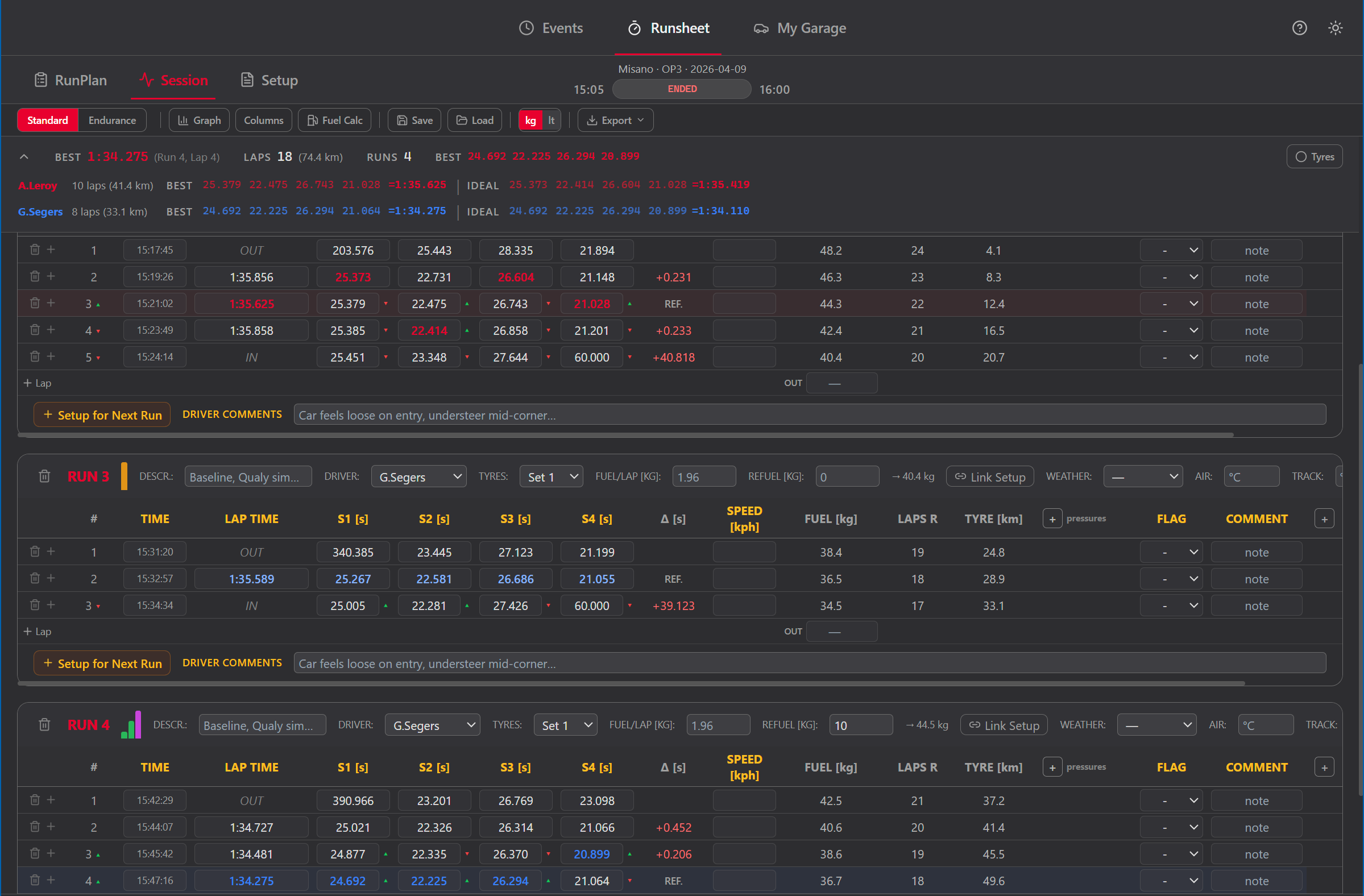
The Events tab is your centralized archive. Create events with track, date, championship, and team context. Add sessions inside each event. Every setup sheet and runsheet links back to an event — nothing gets lost.
Browse all events for the active vehicle. Filter by track, date, championship, or session type. Each event stores full context: car number, chassis, drivers, engineer, mechanic.
Add multiple sessions per event (FP1, FP2, Qualifying, Race). Each session can have its own setup sheet and runsheet.
Select two setup sheets from any session and compare side by side. Changed values are highlighted so you see exactly what moved between runs.
Export a full event (or individual sessions) as JSON. Import on another machine or share with teammates. All context travels with the data.
Log every lap, live
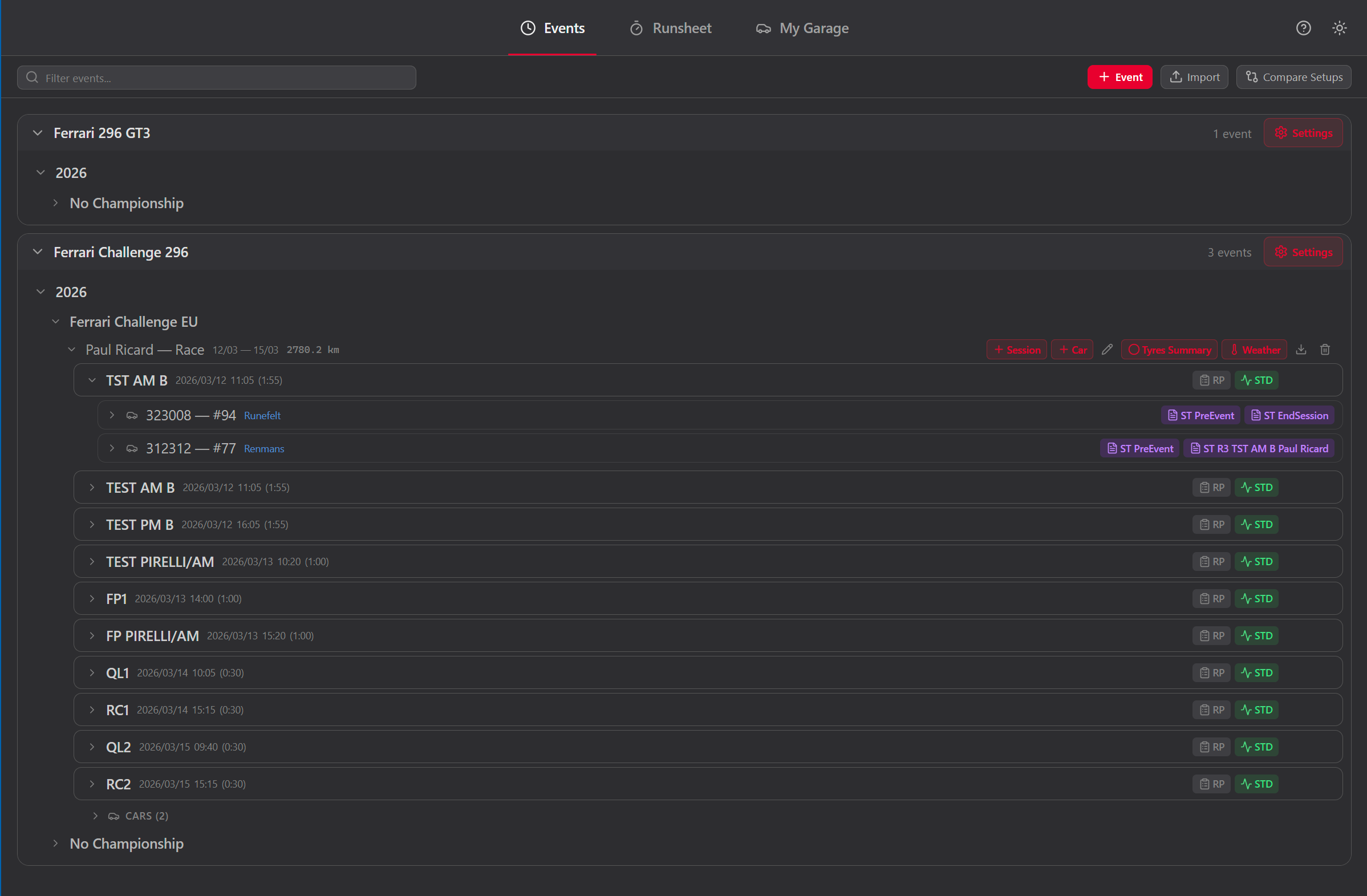
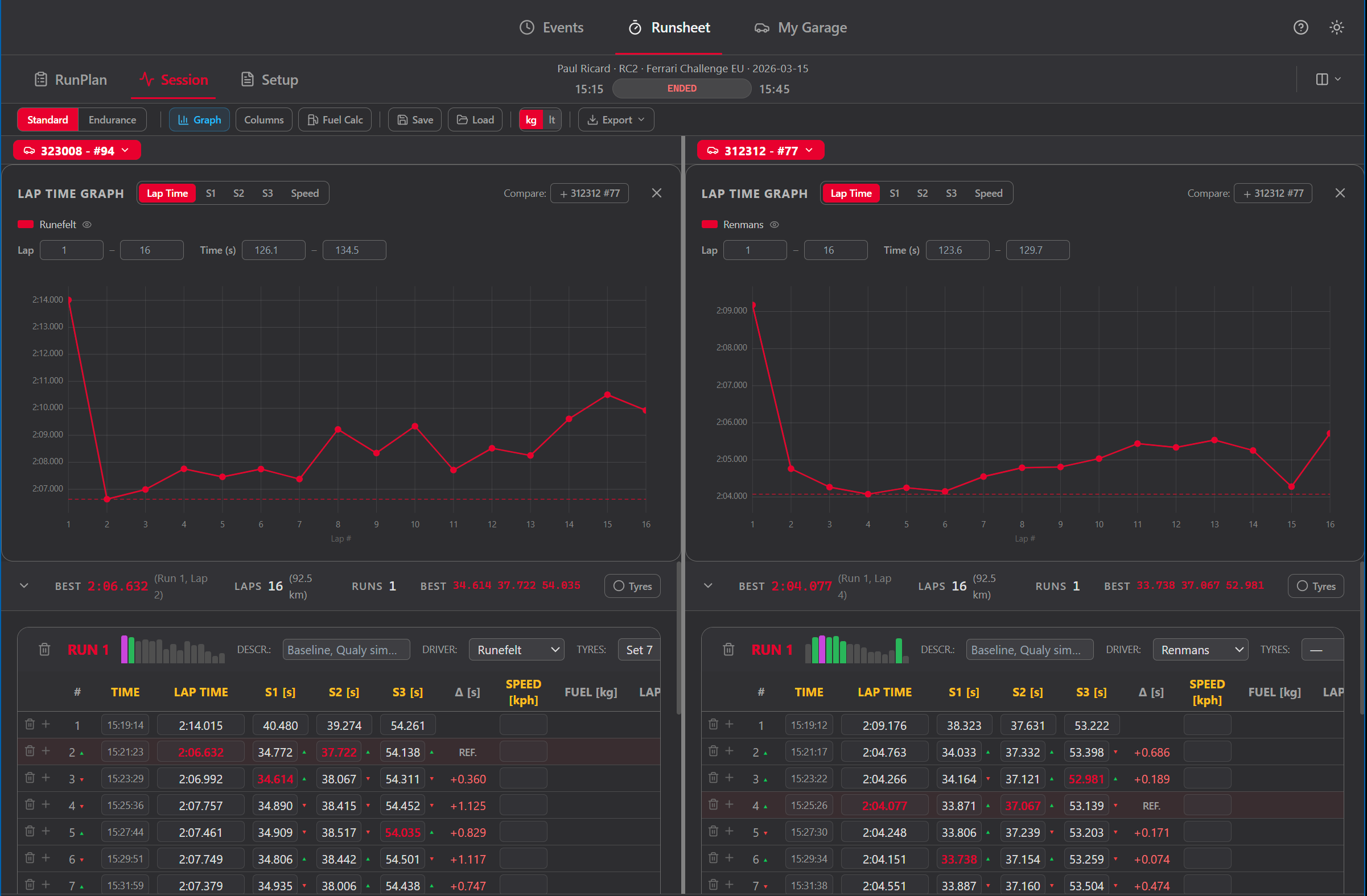
Standard mode is your digital run sheet for practice and qualifying sessions. Organize laps into runs, record lap times with up to 6 sector splits, track fuel consumption, and switch tyre sets — all while the session timer counts down.
Group laps into runs. Each run tracks driver, tyre set, fuel start, and optionally links to a setup sheet. Best lap and sector bests are highlighted automatically.
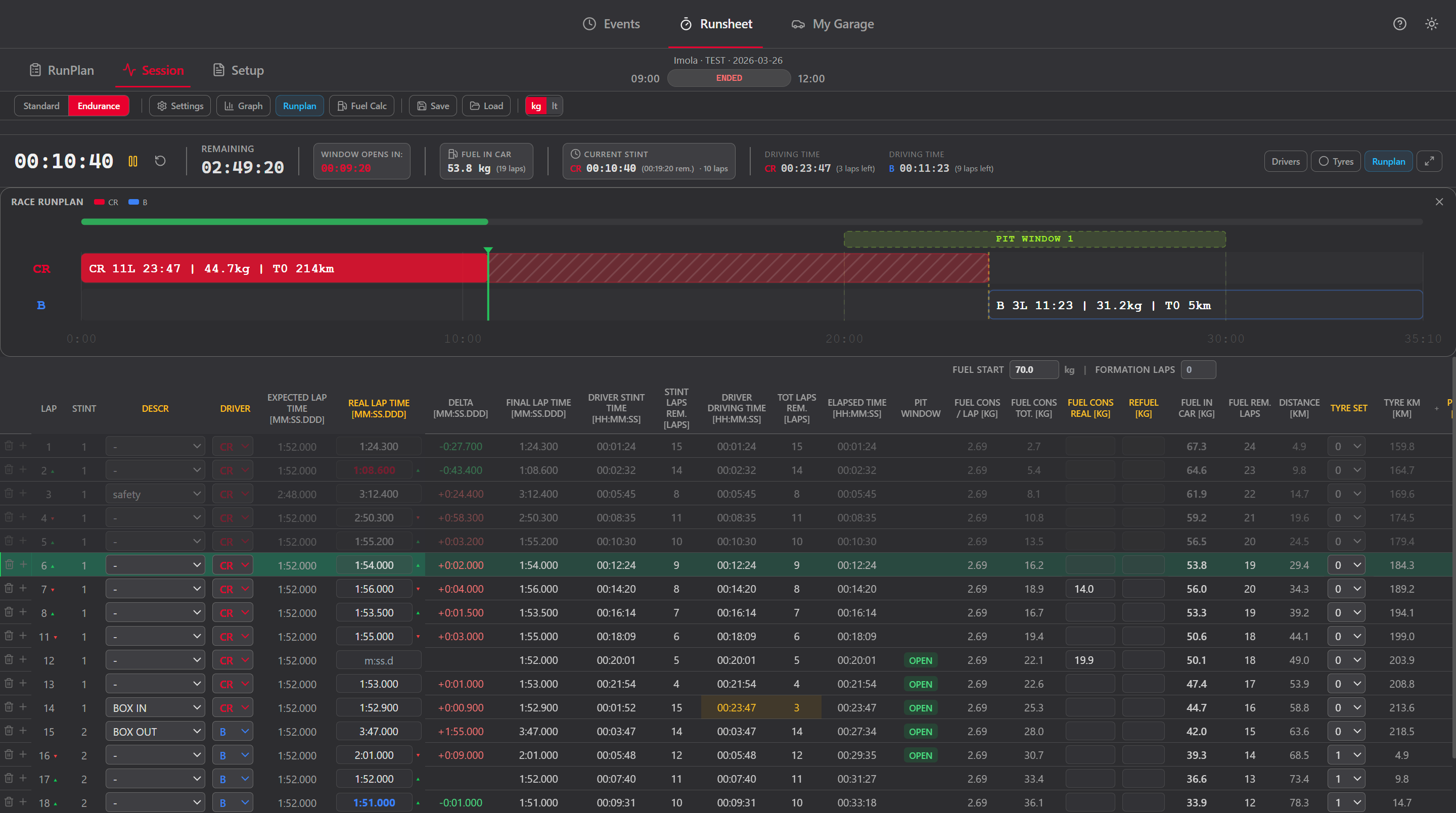
Start, pause, and reset the timer. Remaining time and elapsed time update in real time. The current lap is highlighted in the table.
Visualize lap time trends with built-in graphs. Export the full runsheet to clipboard or file for post-session analysis.
Add per-vehicle custom columns (dropdowns or free text) to log anything that matters for your category — weather changes, balance notes, driver feedback.
Plan before you run
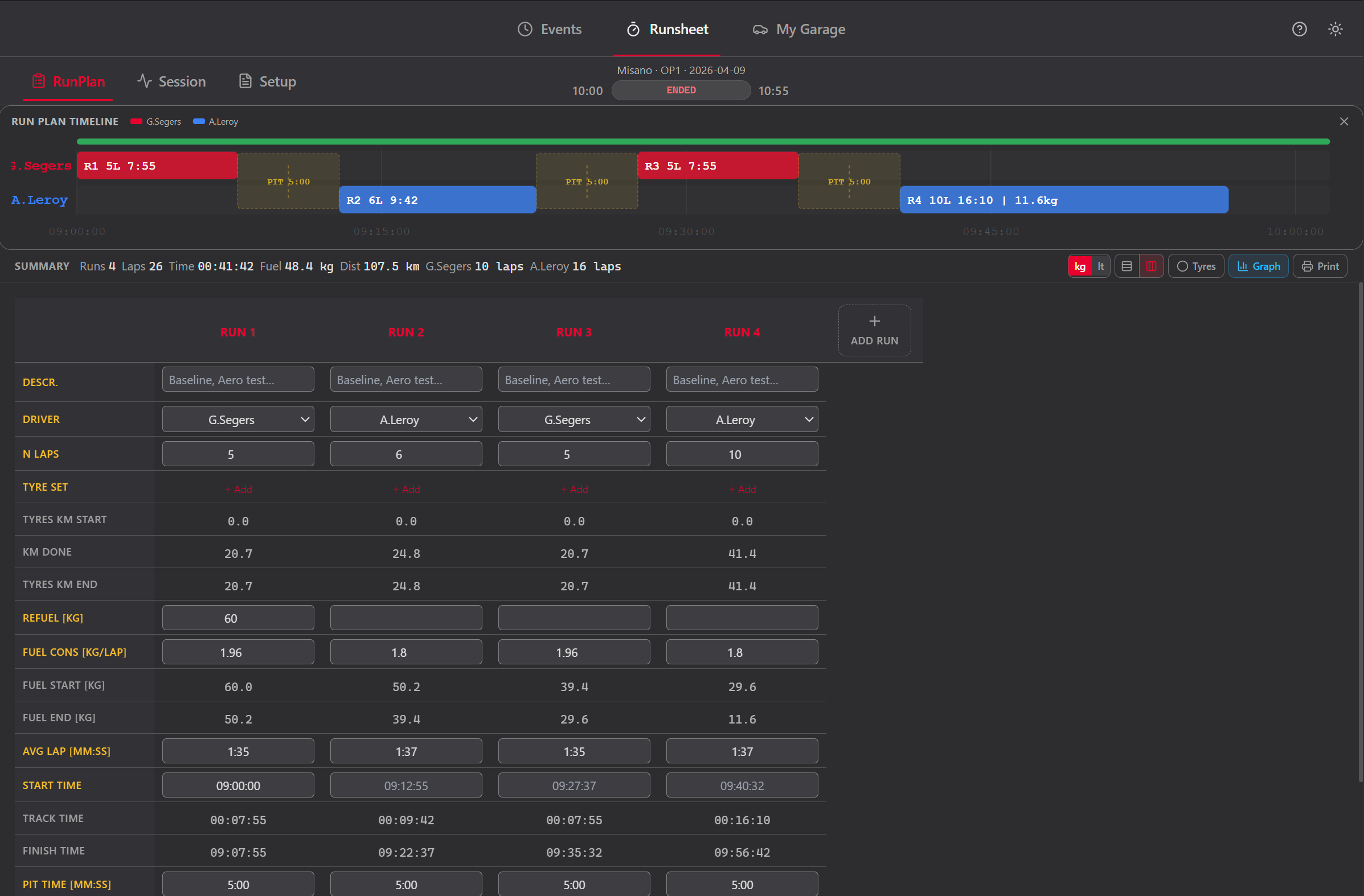
The RunPlan sub-tab lets you lay out the session before the car leaves the garage. Define runs with driver, tyre set, fuel load, and planned laps. Print the plan or keep it open on a second screen.
Add runs in order. Each run has driver, tyre set, planned laps, and fuel start. Drag to reorder. The summary bar shows total laps, time, and fuel.
Define tyre sets for the session. Track which set is used in which run and see total mileage per set.
Print the run plan for the garage wall. The layout is optimized for readability on paper — no dark backgrounds, clean borders.
The setup sheet, redesigned
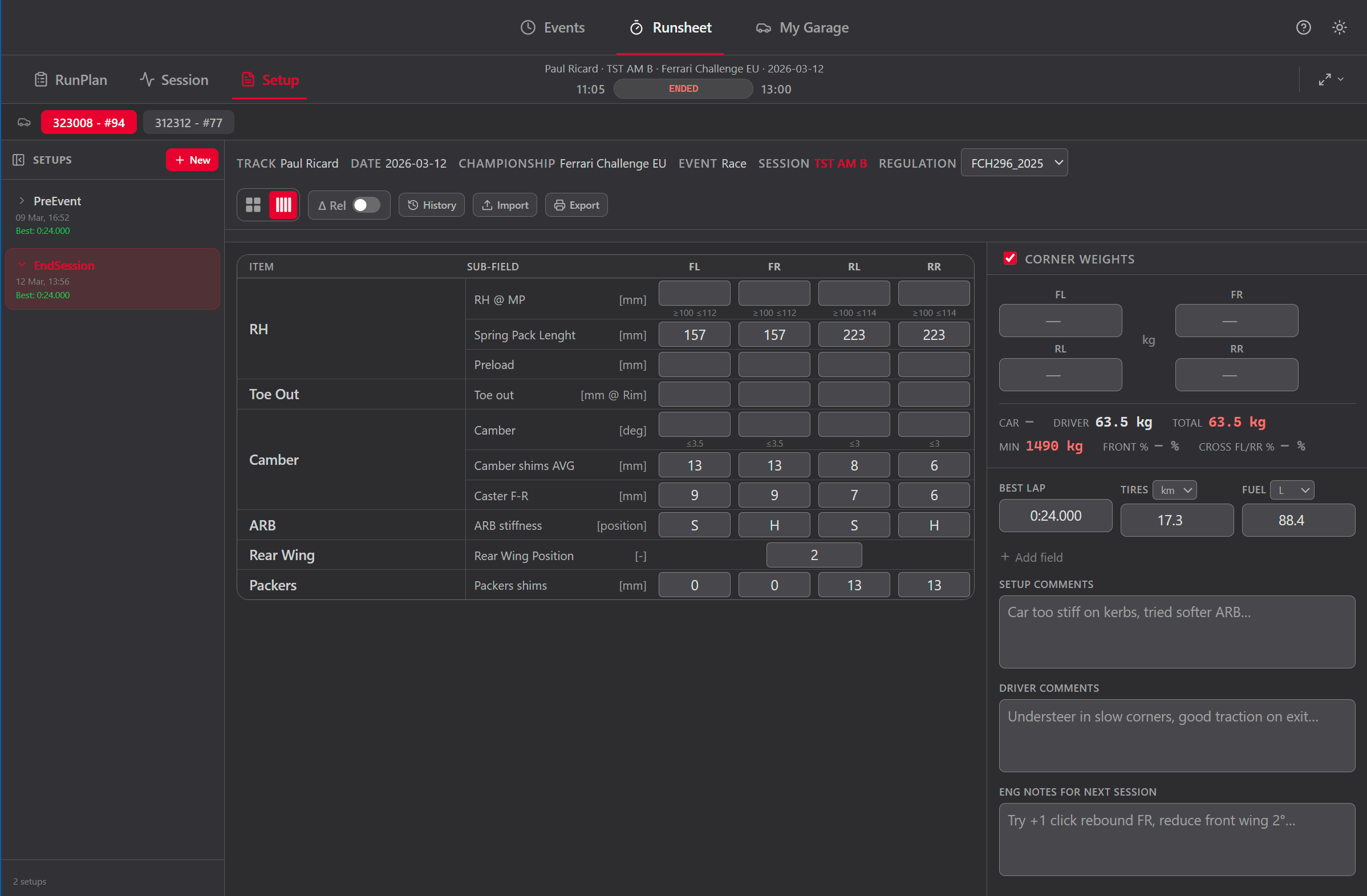
Build and save your car setup for each session. The butterfly layout shows per-corner parameters (FL, FR, RL, RR) exactly how you think about them: left side on the left, right side on the right, labels in the center.
Per-corner, per-axle, and global parameters. Symmetric copy mirrors left values to the right side in one click.
When a regulation set is active, out-of-range values are highlighted. BoP parameters (Turbo Boost, Lambda, fuel load) appear as editable fields.
Optional weights section with Front % and Cross Weight % calculated automatically. Minimum weight warning from the active regulation set.
Best lap, tire mileage, fuel at start, and driver comments are saved with every sheet. Full context is always preserved.
Your vehicles, your rules
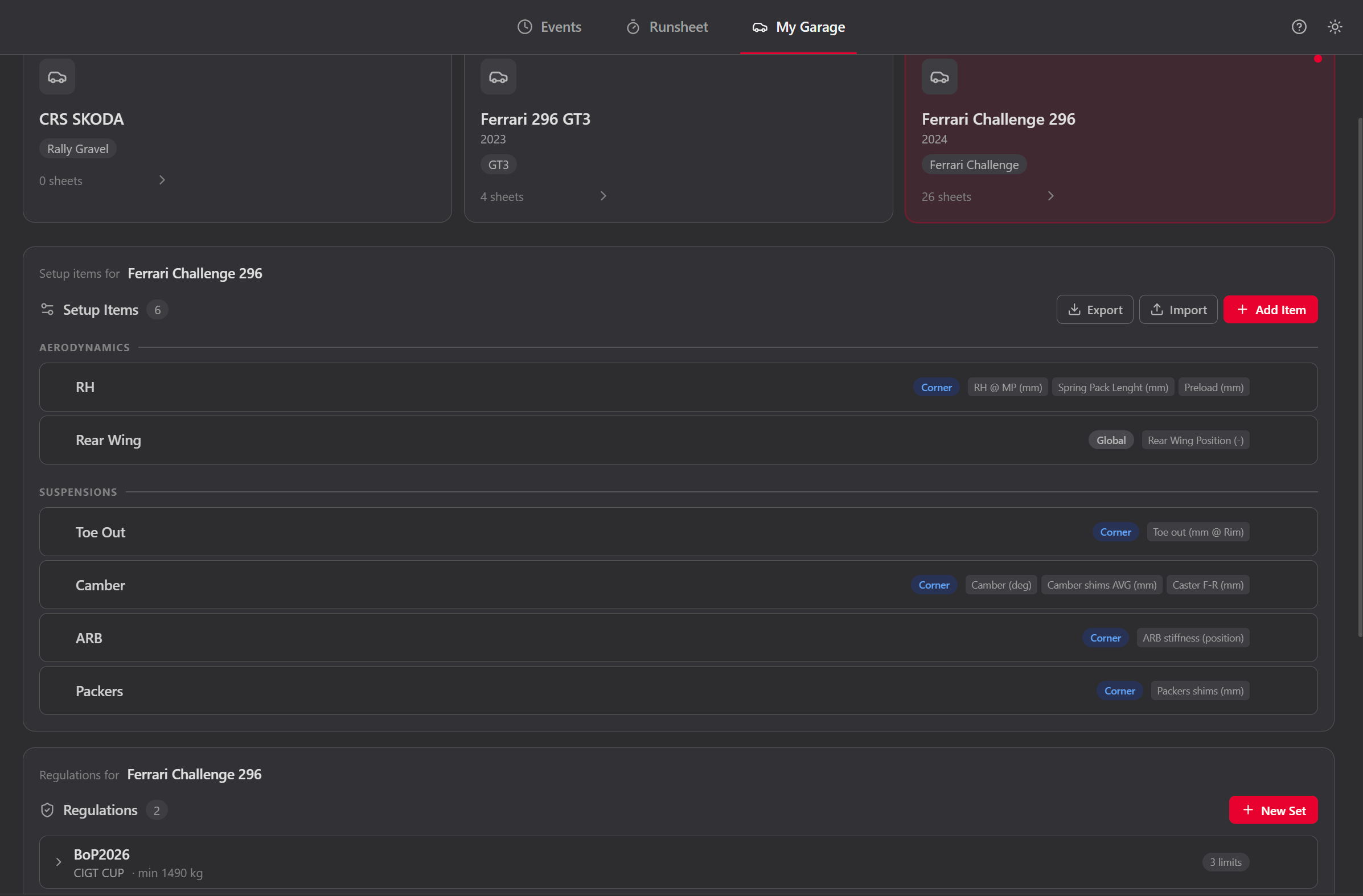
My Garage is your fleet manager. Add vehicles, configure setup templates, manage dropdown lists, define parameter relations, and use the built-in calculator to compute mechanical corrections.
Start from a built-in template (Ferrari 296 GT3, Generic GT3/Cup, Generic Formula) or build your own. Add groups, parameters, units, and per-corner/per-axle layout.
Tracks, drivers, event types, session types, engineers, mechanics, chassis numbers. Each list populates the dropdowns across the app.
Define sensitivity coefficients: "1 turn Preload = 3.02 mm Ride Height". The app uses these to propagate corrections through the parameter chain.
Enter current and target geometry. The calculator solves the linear system and tells you exactly how many turns, shims, or faces to change — accounting for cross-coupling between parameters.
Works for one engineer. Scales to the whole team.
Each engineer runs the app independently on their laptop. At the end of a session, export everything as a single JSON file. The team manager imports all cars into one app instance. No cloud, no sync conflicts — just files.
Logs events, sessions, setups, and runsheets on their own laptop
Export the full event or individual sessions as one JSON file
Hand the file via USB, shared folder, or any method you prefer
Imports files from every car into one app — full fleet overview
A complete race engineering workflow
From the first event plan to the post-session debrief, Runsheet connects the records and calculations a race engineer needs without turning the weekend into another collection of spreadsheets.
Events, TimeTable & multi-car weekends
Plan championships, tracks, event days, sessions, cars, drivers and team context in one motorsport event-management archive.
Digital runsheets & lap timing
Record runs, laps, up to six sectors, clock time, lap status, driver ideals, deltas, custom columns and live session progress.
RunPlan & tyre-heater planning
Build the session run plan, assign drivers and tyre sets, estimate time and fuel, manage warm-up windows, and print the tyre-heater timeline.
Race & endurance strategy
Model formation laps, driver pace, stint limits, tyre changes, fuel targets and Can call or Must call timing for endurance racing.
Fuel calculator & pit timing
Calculate fuel per lap, race consumption, reserve and remaining laps with pit-lane loss, stop duration, margins and driver-specific pace.
Pit windows & refuel towers
Track pit-window countdowns, mandatory-stop logic, refuelling towers, fuel flow and the timing of each planned stop.
Race car setup sheets
Create customizable butterfly setup sheets, compare revisions, highlight changes, calculate corner weights and retain every session setup.
Setup adjustment & vehicle stiffness
Use setup-item relations, adjustment calculations, motion ratios, spring rates, tyre stiffness and anti-roll bar configurations to prepare mechanical changes.
Tyres, drivers & mileage
Track tyre sets and individual barcodes, starting and accumulated mileage, driver assignments, mixed sets and tyre carryover between events.
Tyre pressure management
Store reference runs, cold and hot pressure logs, pressure targets and pit bleeds, then calculate predictions with the gas-law model and share a mobile view.
Weather & track conditions
Log ambient, track and weather conditions against event, session and race timing, then compare trends in the Weather charts.
BoP, regulations & scrutineering
Manage Balance of Performance revisions and curves, regulation limits, scrutineering measurements, compliance state and setup-to-inspection comparison.
Measurements, Faults & Jobs
Record technical measurements, deltas and warnings, follow vehicle faults, and manage the job list for each session and event.
Tech Report & driver Debrief
Compare setup evolution, prepare technical reports, capture driver feedback and produce consistent post-session debrief documents.
Race Control & Follow Cars
Follow competitor sector and lap timing, compare selected cars and keep the race-control view docked or open on a second screen.
Event reports, PDF & data export
Print complete event reports, RunPlans, runsheets, setup and scrutineering sheets, tyre reports and debriefs; export supported data as PDF, XLSX, JSON or text.
Track maps, documents & data links
Keep GPS track layouts, regulations, PDFs, folders and web references with the right vehicle, championship or event, and link runs to local telemetry files.
Offline database, backup & team transfer
Keep the competitive database local, work offline in the paddock, create verified backups and consolidate multiple cars through controlled export and import.
Why not Excel?
- ✕ Complex templates that break when someone edits the wrong cell
- ✕ Multiple files per event, per car, per session
- ✕ No structured history — old versions get overwritten
- ✕ Advanced formulas require engineering skills to build
- ✕ No timer, no live fuel tracking, no pit window countdown
- ✓ Structured forms — impossible to break the layout
- ✓ One app, all events, all sessions, all cars
- ✓ Every setup sheet saved and searchable forever
- ✓ Built-in calculations: fuel, weights, adjustment solver
- ✓ Live timer, fuel tracking, stint management, pit windows
Runsheet race engineering software FAQ
Questions race engineers and teams ask when replacing setup spreadsheets, paper runsheets and separate strategy calculators.
What is Runsheet and who is it for?
Runsheet is race engineering software for performance engineers, data engineers, crew chiefs, team managers, mechanics, and racing teams. It organizes the complete race-weekend workflow: events, sessions, digital runsheets, RunPlan, setup sheets, race strategy, tyres, weather, scrutineering, reports, and debriefs.
Can Runsheet replace Excel setup sheets and race runsheets?
Yes. Runsheet replaces disconnected Excel templates with structured event and session records, digital runsheets, customizable race car setup sheets, setup history and comparison, lap and sector timing, custom columns, printable reports, and verified backup and restore.
What race strategy and pit wall tools are included?
Race and endurance workflows include fuel calculations, fuel margins, formation laps, refuelling strategy, pit timing, pit windows, refuel towers, driver stint limits, tyre changes, driver pace comparison, Race Control, Follow Cars timing, and Can call or Must call strategy guidance.
How does Runsheet manage car setup, BoP, and scrutineering?
The app provides customizable butterfly setup sheets, setup history and comparison, corner weights, adjustment calculations, spring and anti-roll bar stiffness libraries, regulation limits, editable Balance of Performance revisions, scrutineering inspections, compliance status, Measurements, and technical reports.
What tyre management and tyre pressure tools are included?
Runsheet tracks tyre sets, individual tyre identity and barcodes, starting and accumulated mileage, carryover between events, RunPlan tyre-heater windows, cold and hot pressure logs, reference runs, gas-law pressure predictions, pit bleeds, pressure targets, and mobile sharing for the tyre engineer.
What reports and debriefs can Runsheet create?
Runsheet creates printable RunPlans, session and race runsheets, setup sheets, tyre-heater plans, Jobs lists, Tyres and Drivers reports, Tyre Pressure reports, technical reports, scrutineering reports, driver debriefs, and a complete Event Report. Depending on the document, data can be exported as PDF, XLSX, JSON, text, or clipboard content.
What racing categories does Runsheet support?
Runsheet supports GT3, Ferrari Challenge, Cup cars, prototypes, touring cars, karts, formula and single-seater cars, and other circuit-racing categories. Vehicles, setup templates, units, regulations, lists, columns, and workflows are configurable rather than tied to one championship.
Does Runsheet require internet?
Internet is required to create or recover an account, sign in, migrate a licence, and periodically validate access. Motorsport data stays in a local SQLite database. After a successful online check, full offline access remains available for up to 30 days; afterwards the same data remains available for consultation, export, and backup in read-only mode until access is checked again.
How do multi-car teams share Runsheet data?
Each engineer can work independently on a local laptop, then export a complete event or session for transfer by USB or shared folder. A team manager imports the files to consolidate multiple cars without uploading the team's competitive motorsport database to a cloud service.
Download Runsheet
Download and install the app, then create your private account inside Runsheet. Verify your email with the activation code and your 180-day free trial starts immediately.
Preparing download…No website form or licence key is required.